
 Windows Software
 Mac Software
 Freeware
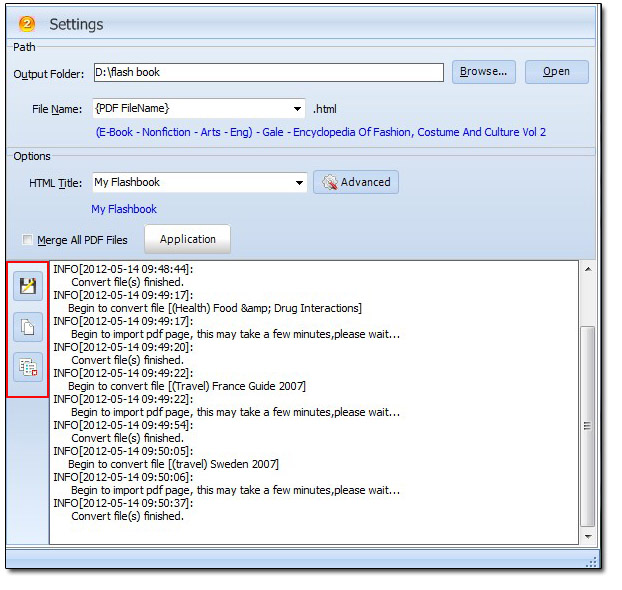
Q:Can I record the page flip book conversion log when I finish my "Batch Convert"?
When I convert several PDF to page flip book at the same time, I want to record the conversion information to make sure that I can check out later on. How can I do with this idea? Should I write down every document’s name on the paper with a pen? However, this is boring. What else can I do?
Don’t worry, you can see there is a log right in the 3D pageflip software. And you can find the button on the left hand of the log window. You can click ‘Save’ to save it as a txt file. You can COPY it and paste in another document. In this case, you will record your page turning book easily and you can save a lot of time to do anything else.
 Popular Download
- 3D PageFlip Professional
- 3D PageFlip Standard
- 3D PageFlip Pro for Mac
- 3D PageFlip for PowerPoint
- 3D PageFlip for Image
You May Like
- How to pay for Upload Service
- Easy send created realistic newspaper to customers
- How to display YouTube to 3D eBook page
- How to use themes in 3D PageFlip software
Any questions? Click the below button to contact us soon.